 . A new row will appear in the table.
 Attributes refer to a component of your business that cannot be measured numerically and therefore, cannot be used as a variable when calculating the model.
There are three types of attributes represented in the application:
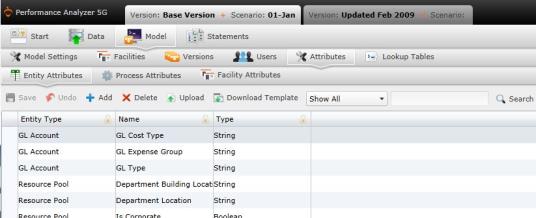
Entity Attributes: Attributes that identify specific elements of an entity, such as entity type or name.
Process Attributes: Attributes that identify business processes.
Facility Attributes: Attributes that identify facilities.
To add an attribute manually:
Select . A new row will appear in the table.
Type the name of the attribute and its data inside the fields.
The Attribute table contains the following columns:
• Entity Type: Defines the type of data that the entity belongs.
• Name: Name given to the attribute.
• Type: Type of data.
Select  to save the attribute.
To upload files:
 . A download pop-up screen will appear. Make your selections and select "OK."
 . The "Upload" panel will open. .
What if the records fail to upload?See Edit Failed Records.
Select  at any time to delete any changes you have made. Select
  to delete an entire process.
Related Topics: